Square POS Integration Guide
Connecting Square POS to LoyaltyMatch
Overview
The Square POS integration allows LoyaltyMatch to connect your Square account to your loyalty program. This connection gives LoyaltyMatch access to the Square data required to complete the integration with your loyalty server.
The program administrator starts the setup by authorizing the LoyaltyMatch Connect App in Square. After authorization is complete, LoyaltyMatch will finish the server-side setup and connect Square to the LoyaltyMatch loyalty server.
Before You Begin
- You must be able to sign in to the Square account that will be connected to the loyalty program.
- You must have permission in Square to authorize third-party applications.
- LoyaltyMatch will provide the authorization link for your program.
Authorize the Connection
- Open the Square authorization link provided by LoyaltyMatch.
- Sign in to Square with the account you want to connect.
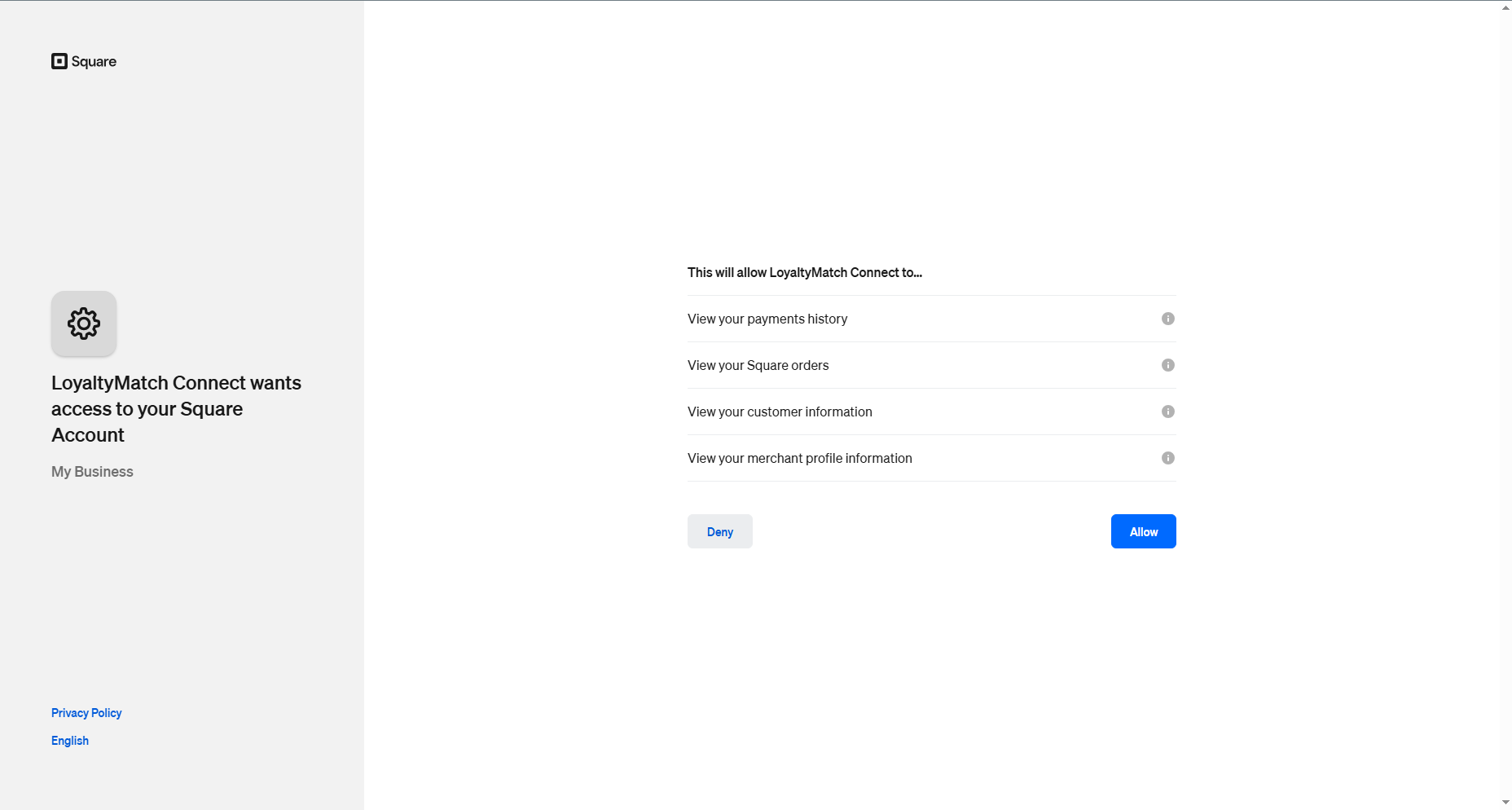
- Review the permissions requested by the LoyaltyMatch Connect App.
- Click the authorization button to allow LoyaltyMatch to use the requested Square data.
- Wait for the confirmation or redirect page to load.
The Square authorization screen will identify the app as the LoyaltyMatch Connect App and list the data access being requested. Only authorize the connection if the Square account shown is the correct account for your loyalty program.
Manage Customers in Square Customer Directory
Square Customer Directory is where you can add and manage customer records online before or after transactions are created. This is useful when you want to keep guest profiles organized and ready to match with loyalty activity.
Original Square guide: Manage your customer directory online.
- Sign in to your Square Dashboard.
- Open Customers and go to the customer directory.
- Add or update customer records as needed.
- If you are importing customers, use the workflow and file format shown in the Square guide.
- Save the customer list so it is available for later transactions and loyalty matching.
After Authorization
Once the program administrator authorizes the connection, LoyaltyMatch receives the approval from Square and completes the remaining setup. LoyaltyMatch will connect Square POS to the loyalty server and enable the integration for your program.
No additional Square configuration is normally required from the program administrator after the authorization step. LoyaltyMatch will contact you if any account details, permissions, or location settings need to be confirmed.
How Members Earn Points
During a Square POS transaction, a Customer can be added to the transaction. The customer can be added at the time of the sale, or selected from customers that have already been added to the Square system.
Once a customer is attached to the transaction, LoyaltyMatch will attempt to find the matching loyalty member on the loyalty server using the customer's email address or telephone number.
If a matching loyalty member is found, points are awarded to that member account based on the amount of the Square POS transaction.
Integration Checklist
- ☐ Receive the Square authorization link from LoyaltyMatch
- ☐ Sign in to the correct Square account
- ☐ Authorize the LoyaltyMatch Connect App
- ☐ Confirm the authorization process completes successfully
- ☐ Wait for LoyaltyMatch to complete the server-side connection
Need Help?
If the authorization page does not load, the wrong Square account is shown, or the authorization is denied by Square, contact LoyaltyMatch support before trying again.